Rotarian
Rotary speaker: a horn and a drum turning at Slow or Fast with their own inertia, heard by two microphones, with a brake and beat-locked speeds.
Parameters
| Parameter | Range | Default |
|---|---|---|
| Speed | Slow, Fast | Slow |
| Brake | Off, On | Off |
| Sync | Free, Beat | Free |
| Crossover | 300 – 2000 Hz | 800 Hz |
| Mic Angle | 0 – 180 deg | 90 deg |
| Horn Slow | 0.3 – 1.5 Hz | 0.8 Hz |
| Horn Fast | 4 – 9 Hz | 6.7 Hz |
| Horn Accel | 0.1 – 4 s | 0.8 s |
| Horn Depth | 0 – 100 % | 60 % |
| Horn Doppler | 0 – 100 % | 100 % |
| Drum Slow | 0.3 – 1.2 Hz | 0.67 Hz |
| Drum Fast | 3 – 8 Hz | 5.7 Hz |
| Drum Accel | 0.5 – 10 s | 3.5 s |
| Drum Depth | 0 – 100 % | 40 % |
| Drum Doppler | 0 – 100 % | 80 % |
| Horn Slow Beats | 8, 4, 3, 2, 1.5, 1, 3/4, 1/2, 1/3, 1/4, 1/6, 1/8 | 2 |
| Horn Fast Beats | 8, 4, 3, 2, 1.5, 1, 3/4, 1/2, 1/3, 1/4, 1/6, 1/8 | 1/3 |
| Drum Slow Beats | 8, 4, 3, 2, 1.5, 1, 3/4, 1/2, 1/3, 1/4, 1/6, 1/8 | 3 |
| Drum Fast Beats | 8, 4, 3, 2, 1.5, 1, 3/4, 1/2, 1/3, 1/4, 1/6, 1/8 | 1/2 |
| Sync Phase | 0 – 360 deg | 0 deg |
| Horn Level | -24 – 12 dB | 0 dB |
| Drum Level | -24 – 12 dB | 0 dB |
| Output | -24 – 12 dB | 0 dB |
Overview
Rotarian is a rotary speaker cabinet. Inside it, two parts turn: a horn that throws the highs and a drum that throws the lows. As each one turns toward a microphone and away again, the sound swells and fades, and its pitch wobbles a little as the horn or drum swings toward and away from the microphone. Slow is the chorale; Fast is the tremolo.
The horn is light and changes speed quickly; the drum is heavy and takes its time, so when you switch speed you hear the two speed up or slow down apart.
Rotarian sums what comes in to mono, splits it between the drum and the horn, and sends out stereo: one microphone on each side. You find it in the Modulation category of the device browser.
Speed and Brake
The three big buttons on the left are the motor:
- SLOW: the chorale. The rotors glide to their Slow speeds.
- FAST: the tremolo. The rotors glide to their Fast speeds.
- BRAKE: stops both rotors. They coast to rest, each at its own pace, and the heavy drum takes the longest: at the default settings it takes about 40 seconds to stop completely after Fast. Tap BRAKE again and they spin back up to the speed you had, Slow or Fast. Tapping SLOW or FAST also releases the brake.
While the brake is on, BRAKE is lit red, the speed it will return to keeps a ring, and the line under the buttons says which one it is.
How quickly each rotor changes speed is its Accel, on the Horn and Drum pages.
Speed and Brake can each be assigned to a footswitch (see Footswitch assignment).
Free and Beat
The FREE and BEAT switch chooses where the speeds come from.
- FREE: you set each rotor’s Slow and Fast speeds in Hz (turns per second) on the Horn and Drum pages.
- BEAT: the speeds come from the tempo, in beats per turn, which you set on the Beat page. BEAT shows the tempo it is using. Axion has one tempo, the metronome’s (see Tempo).
In Beat mode the speeds always follow the tempo, whether or not anything is playing. The rotors also lock to the beat (with Phase at 0°, they face front on the beat), but only while a song plays. A lamp at the top of the rotor picture reads LOCKED while they are locked, and “Locks while a song plays” when they are not.
The panel
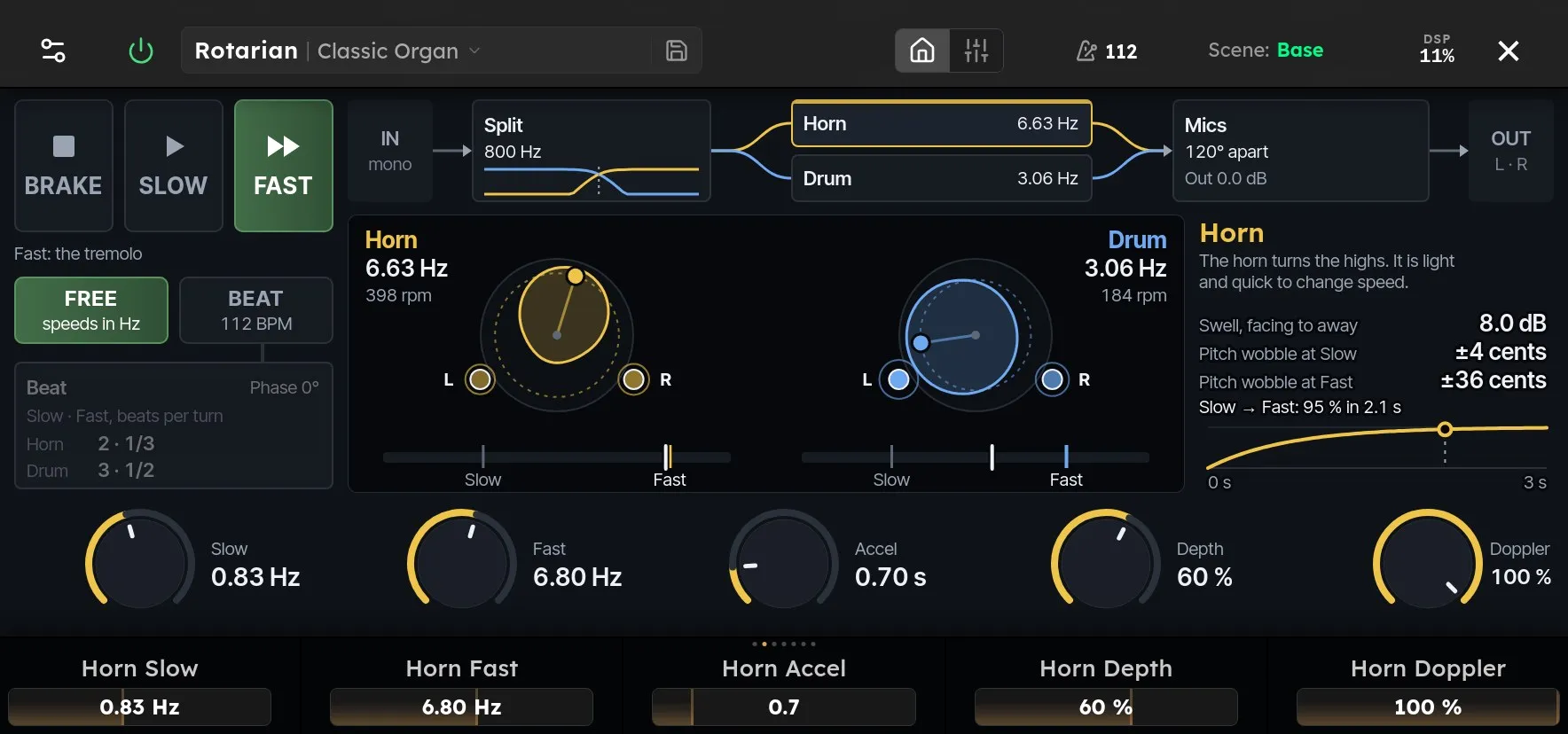
Across the top is the signal path: IN (your signal, summed to mono), Split, the Horn and the Drum side by side, Mics, and OUT (left and right). Each tile shows what its stage is set to: the crossover frequency on Split, each rotor’s speed right now on Horn and Drum, and the microphone angle and Output level on Mics.
Under it, the two rotors are drawn from above, the front of the cabinet at the bottom between the two microphones, L and R. Each rotor turns at its real speed. The shape around it shows which way it is loudest, and each microphone brightens as that loud side sweeps past it.
Under each rotor is its speed bar: a tick for its Slow speed and one for its Fast speed, the one in use lit, and a marker at its speed right now. Watch the marker glide from one tick to the other after you tap SLOW or FAST. The speed is also shown in Hz and in rpm.
Tap a tile to open that stage. On the right you see its name, what it does, and a picture of it. Its knobs sit directly above the encoders, so the knob you see is the knob under your hand. Turn the encoder or drag the knob.
Tapping a tile also turns the encoder dock to that stage’s page, and swiping the dock to a stage’s page opens that stage. The dock has two more pages after the five stages: Speed, Brake and Sync, then Input Trim, Mix and Output Trim. Those pages leave the open stage as it is.
A knob that does nothing in the current mode is greyed out, not hidden: in Beat mode the four Slow and Fast speeds in Hz read “Set by Beat”, and in Free mode the Beat page’s controls read “Beat only”. In the details list and on the encoders those controls stay live, but they have no effect in that mode.
The stages
Split
Splits the signal between the drum, which gets the lows, and the horn, which gets the highs.
- Crossover (300 to 2000 Hz, 800 Hz by default): where the split falls. Raise it to keep more of the sound on the drum.
- Drum Level and Horn Level (−24 to +12 dB): the level of each.
The picture shows the two halves of the sound, with each level applied and a marker at the crossover.
Horn and Drum
The two rotors have the same controls.
- Slow and Fast: the speeds in Free mode, in Hz. The horn’s Slow runs from 0.3 to 1.5 Hz (0.8 by default) and its Fast from 4 to 9 Hz (6.7); the drum’s Slow from 0.3 to 1.2 Hz (0.67) and its Fast from 3 to 8 Hz (5.7).
- Accel: how long the rotor takes to change speed. The horn’s runs from 0.1 to 4 seconds (0.8 by default), the drum’s from 0.5 to 10 seconds (3.5).
- Depth (0 to 100 %): how much louder the rotor is when it faces a microphone than when it faces away. This is the swell.
- Doppler (0 to 100 %): the pitch wobble as the rotor swings toward and away from the microphones. At 0 % there is none.
The picture shows the swell in dB, the pitch wobble in cents at the Slow and at the Fast speed, and a curve of a change from Slow to Fast with the time it takes to get 95 % of the way.
Mics
- Mic Angle (0 to 180°, 90° by default): the angle between the left and right microphones. At 0° both hear the same, so the sound is mono. At 180° they sit on opposite sides of the cabinet, and the swell reaches one side as it leaves the other.
- Output (−24 to +12 dB): the level out of the cabinet.
The picture shows what the left and right microphones hear of the horn over one turn.
Beat
Used only in Beat mode. Open it with the Beat tile under the FREE and BEAT switch.
- Horn Slow, Horn Fast, Drum Slow and Drum Fast: each speed in beats per turn, from 8 down to 1/8. 2 is one turn every two beats; 1/3 is three turns every beat.
- Phase (0 to 360°): where the rotors point on the beat while they are locked to a playing song.
The picture shows each speed as a note value against four beats, with a mark wherever the rotor faces front.
Mix
Rotarian’s own sound is the cabinet alone. The Mix on the dock, which every device has, blends your unprocessed signal back in. The cabinet’s sound runs a fraction of a millisecond behind your signal, so a Mix below 100 % also adds a comb-filter colour that moves with the rotors. For the cabinet on its own, leave Mix at 100 %.
Presets
The presets are starting points: try them, then adjust to your guitar and your rig.
- Rotarian (the default): Slow, the horn and drum at their classic speeds, the microphones 90 degrees apart.
- Classic Organ: the organ cabinet: a slow chorale that winds up to a fast tremolo, the drum lagging behind the horn.
- Guitar Rotary: for guitar: a higher crossover and a lighter drum, so the low strings stay steady and the top end turns.
- Deep Vibrato: Fast, with full Doppler on both rotors and little swell: more pitch wobble than throb.
- Wide Chorale: a slow, wide turn with the microphones on opposite sides of the cabinet.
- Beat Locked: Beat mode: the horn turns once every two beats on Slow and three times a beat on Fast, locked to the song while one plays.
Tips
- Switch between SLOW and FAST as you play, and listen to the horn and the drum change speed apart.
- To keep the low strings steadier, raise Crossover or lower Drum Depth, as Guitar Rotary does.
- For a wide stereo sound, raise Mic Angle toward 180°. For a mono rig, set it to 0°.