Connections
What each port on the Axion unit is for and how to connect to it.
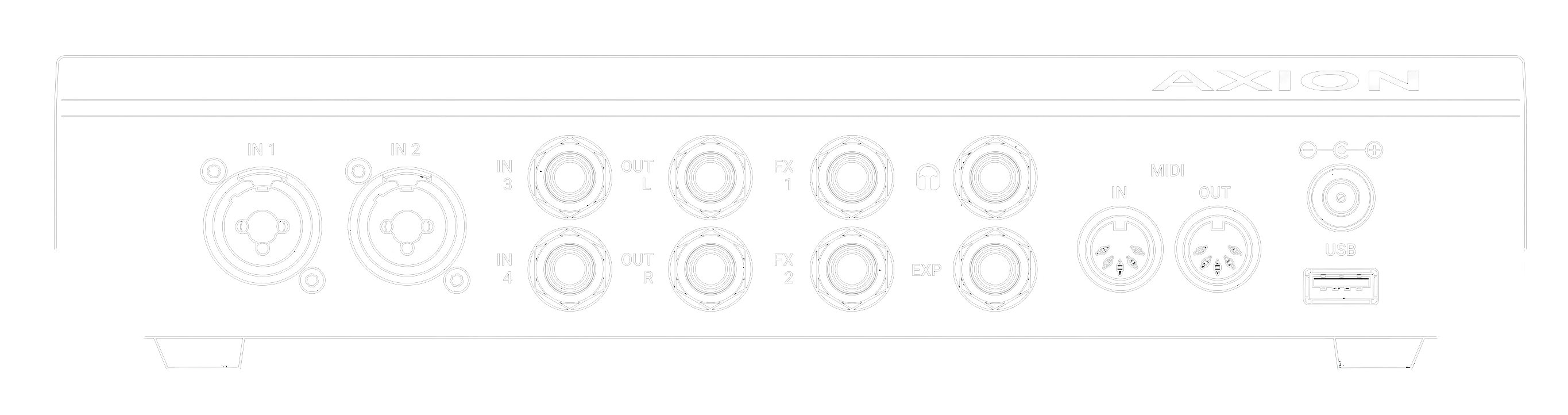
Inputs
IN 1 & IN 2: instrument & microphone
Combo jacks that accept either a 1/4” TS plug (for unbalanced, e.g. guitar input) or an XLR for balanced input or microphone. The 1/4” input is high-impedance (Hi-Z) buffered, so it’s the right input for a guitar, bass, or other instrument with passive pickups, but it will work with active pickups as well. The XLR side takes a microphone or any XLR line-level balanced input.
Unlike the rest of Axion’s I/O jacks, the TRS connectors for inputs 1 and 2 are not balanced line-level inputs. They are special-purpose jacks for unbalanced input. To connect a keyboard, synth, or other line-level source to inputs 1 or 2, use an XLR cable. Otherwise, use input 3 or 4 for line-level TRS inputs.
IN 3 & IN 4: balanced line & FX returns
These 1/4” TRS jacks accept balanced, line-level sources such as keyboards and synths. They can also double as the return side of an effects loop: paired with the FX sends, they bring an external pedal or rack unit back into the signal chain. Unlike inputs 1 and 2, these two inputs are low impedance and are not ideal for directly plugging in a guitar with passive pickups, unless you use a buffer such as powered pedal or wireless guitar adapter.
CAUTION:
Never plug the output of a power amp into any of Axion’s inputs. Doing so risks deep-frying your audio board, which will render your Axion useless until it is repaired or replaced.
Outputs
OUT L & OUT R: main outputs
The main stereo outputs. 1/4” TRS and balanced, but they also work unbalanced with a standard TS cable, for example straight into the front of a guitar amp. Typical destinations:
- A pair of FRFR (full-range, flat-response) powered speakers, the most common setup for amp-modeled tones
- An audio interface, mixer, or recording input
- The input to a power amp and cabinet, or the input to a traditional amp
FX 1 & FX 2: effects sends
Two additional balanced 1/4” TRS outputs, typically used as the send side of an effects loop, tapping the signal out to an external pedal or processor that returns through IN 3 / IN 4. They can also serve as extra auxiliary outputs, for example to stage monitors or amps, in-ear monitors, or additional mixers.
Headphones
A stereo headphone output for quiet practice and monitoring.
Control & connectivity
EXP: expression pedal
A 1/4” TRS jack for a continuous expression pedal, for real-time, foot-controlled changes to assigned parameters such as volume or wah.
MIDI In & MIDI Out
MIDI input and output for remote control and clock sync. Common uses:
- A MIDI foot controller selecting rigs by program change
- A DAW driving Axion during a recording session
- A drum machine or sequencer providing tempo to delay devices
See Rigs and Set Lists for how MIDI bank / program change maps to set lists and rigs.
USB-C
A USB-C port for connecting to a computer. Axion appears as an audio interface to your DAW, for recording its output and for re-amping, sending a recorded DI track back through the unit to capture a new tone.
Power
DC input
The barrel jack for the supplied power adapter. Use the adapter that ships with the unit. If you need a replacement power supply, go to https://severedcircuits.com.