Rig Mode
The loaded rig as a signal chain: read it, open a device, bypass it, move it.

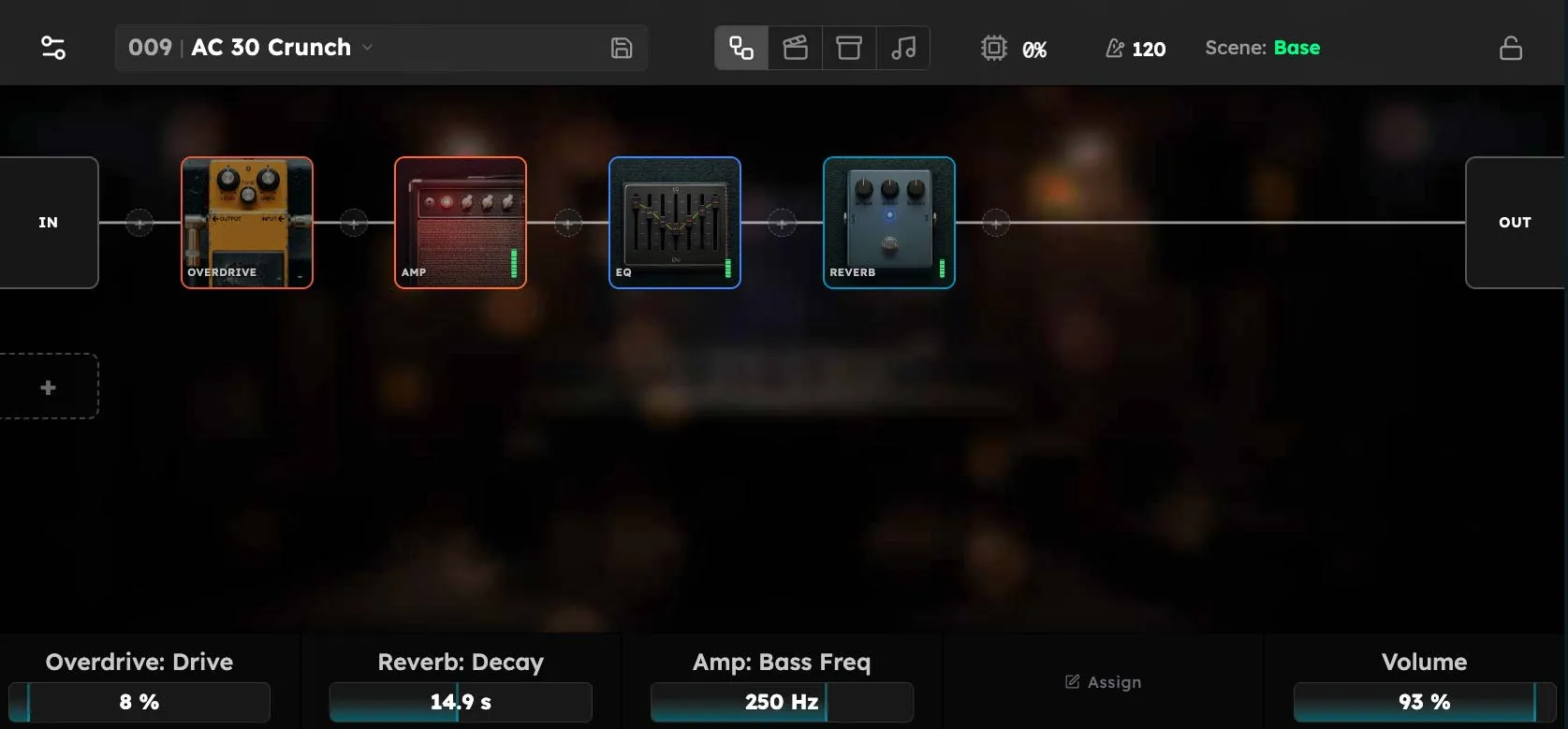
Rig Mode draws the loaded rig as a signal chain: an IN block on the left, your devices in the order they process, and an OUT block on the right, with the signal line running between them. A chain fits six devices per row and wraps to the next row when it needs more. If the rig has more than one chain, each chain gets its own block, stacked down the screen.
This is the mode you sit in while working on a sound, and the one that shows you what is actually happening to your signal.
Reading the chain
Each device is a tile carrying its own artwork, with a coloured border for its category: drive, reverb, dynamics, and so on. A lit tile is active. A dimmed tile is bypassed, and the signal simply passes through it.
Two things will interrupt to tell you something is wrong:
- A flame on a tile means that device’s output has peaked above −1 dBFS and is on the edge of clipping. Tap the flame to open the Auto Level utility. The flame stays for ten seconds after levels come back down, so a single hot note does not vanish before you notice it.
- A yellow warning triangle means a problem has occurred with that device and it is bypassed. Tap the device to view more information about the problem.
Touch Controls
- Tap a device to open its own full-screen page, where all of its parameters can be modified.
- Double-tap a device to bypass or un-bypass it without opening it.
- Tap and hold a device to pick it up, then drag. Drop it on another device to swap the two, on any insert point to move it to that position, or on Remove Device at the bottom of the screen to take it out of the rig.
- Tap a + dot between two blocks to open the device browser and add a device at exactly that point in the chain.
- Tap IN or OUT to open the chain’s input or output block. These are devices too, with their own parameters and their own power button, which is why bypassing one silences the chain.
- Tap a + on the left to add a new chain. Multiple chains run in parallel, and can use separate cores for increased DSP capacity and throughput.
Along the bottom of the screen, the five knobs show whatever this rig has bound to them; see Rig Controls for how that binding is set.
Rig Mode is the view. The work of assembling a rig (choosing devices, adding chains, saving the result) is covered in Building Rigs.
Plug & Play rigs
A Plug & Play rig is a special type of built-in rig that has no chains to edit. For these, Rig Mode shows the Plug & Play stage instead: the amp and its handful of curated knobs. If you wish to edit the routing or add more complex chains, save the Plug and Play rig to a new rig first, then reload it.