Plug & Play
Pick a ready-made style and play. The fastest path from silence to a great tone.

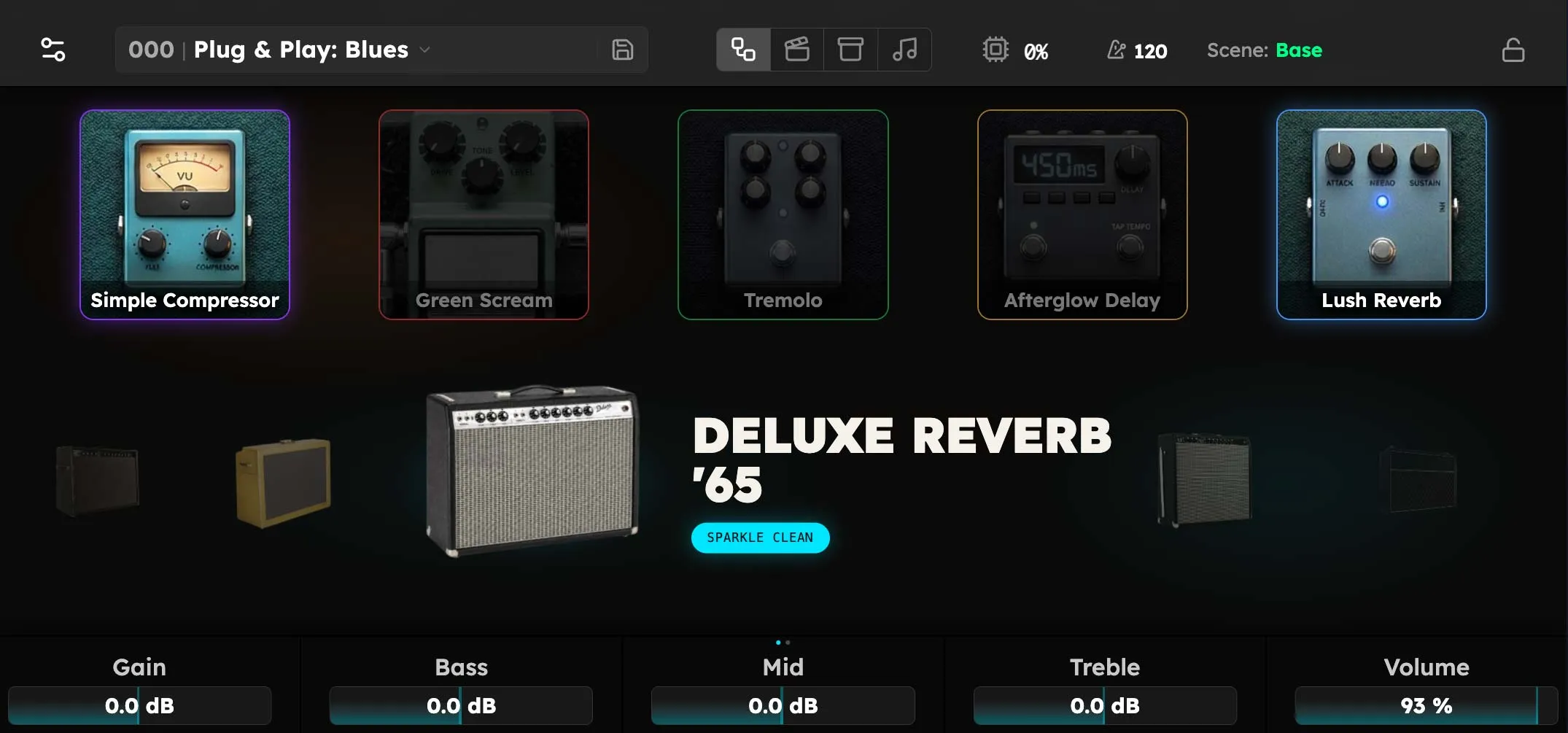
Plug & Play is the fastest way to start playing guitar through Axion. Instead of building a rig device by device, you pick a ready-made style (Blues, Metal, Country, and so on) and start playing. The amp and pedals are already chosen and dialed in by hand. Tweak nothing, or tweak everything: the same style is a great tone the instant it loads and a full editing surface if you want to dig in.
Plug & Play is a good place to start on day one, and a fast way to find a starting point any time.
User interface is being finalized. The Plug & Play stage described below is functional, but the exact way you open it and some on-screen labels may change before the production release. The behavior (pick a style, play, tweak) is stable.
Opening a Plug & Play style
Open the rig browser. Pinned at the very top of the list is a collection named Plug and Play Rigs. Each entry is a complete, professionally voiced style:
| Style | Character |
|---|---|
| Blues | Warm breakup with just enough dirt. |
| Classic Rock | Cranked British crunch and sustain. |
| Metal | Tight, scooped, modern high gain. |
| Country | Sparkle-clean twang and chicken pick. |
| Funk | Snappy clean with a squeezed compressor. |
| Indie | Jangle, chime, and washy ambience. |
| Worship | Lush, ambient, pedal-stacked cleans. |
| Jazz | Round, dark, glassy clean tone. |
Tap a style to load it. The screen switches to the Plug & Play stage and you can play immediately.
The stage
The stage is laid out in three zones, top to bottom:
Pedalboard (top)

Up to five pedals sit across the top as tiles, in signal order.
- Tap a pedal to open its full controls, exactly as you would in the editor.
- Double-tap a pedal to bypass it (turn it off) or switch it back on. A bypassed pedal dims.
- The colored glow around each pedal matches its footswitch light, so you can tell at a glance which physical switch controls it.
Any empty slots show an Add button. Tap it to drop another pedal into the chain.
Amp (middle)

The center of the stage is the amp. Swipe left or right to move through the available amp voicings; the one in the center is the one you hear. Tap the centered amp to open its full controls.
Parameters (bottom)

The first page keeps the familiar Gain, Bass, Mid, Treble, and Volume controls lined up directly above the five physical encoders under the screen. Swipe the dock left to reach a second page of useful controls from the pedals in the style, such as Drive, Boost, and reverb or delay Mix. The exact second page follows the pedals that are present.
- Gain and the three tone controls read on a familiar amp-style 0–10 scale.
- Volume reads as a percentage and shows MUTE at the bottom of its travel.
- Turning a physical encoder always controls the five assignments on the visible page.
Footswitches
The bottom row of five footswitches maps to the five pedals on the board: press a footswitch to toggle its pedal on or off, the hands-free version of double-tapping the tile. Each footswitch’s light matches its pedal’s color and dims when that pedal is bypassed. Footswitches under empty slots stay dark.
The performance controls you rely on elsewhere (the tuner and other press-and-hold functions) remain available while you’re in Plug & Play.
Making it your own
Nothing about Plug & Play is locked. From the stage you can:
- Swap the amp by swiping the carousel to a different voicing.
- Add a pedal with the Add slot, or open any pedal and change its settings.
- Bypass anything you don’t want, from the screen or a footswitch.
- Dial the amp with the five knobs or the hardware encoders.
If you open a device, you get its complete parameter set. Plug & Play is a friendlier front door to the same engine, not a walled-off “lite” mode. When you land on something you love, save it as your own rig from the top bar so you can recall it later. See Building Rigs for how saving and organizing rigs works.
Leaving Plug & Play
Load any other rig, from a set list or anywhere else in the rig browser, and Axion returns to the full experience. The Plug and Play Rigs collection stays pinned at the top of the browser, so a ready-to-play style is always one tap away.
You can’t break the styles. The Plug and Play Rigs are a fixed, factory collection. Reopening a style always brings it back exactly as it shipped, so experiment freely. The original is never overwritten.