Global EQ
One eight-band equalizer on the output of every rig. Match Axion to your speakers, your room, or the PA without editing a single rig.

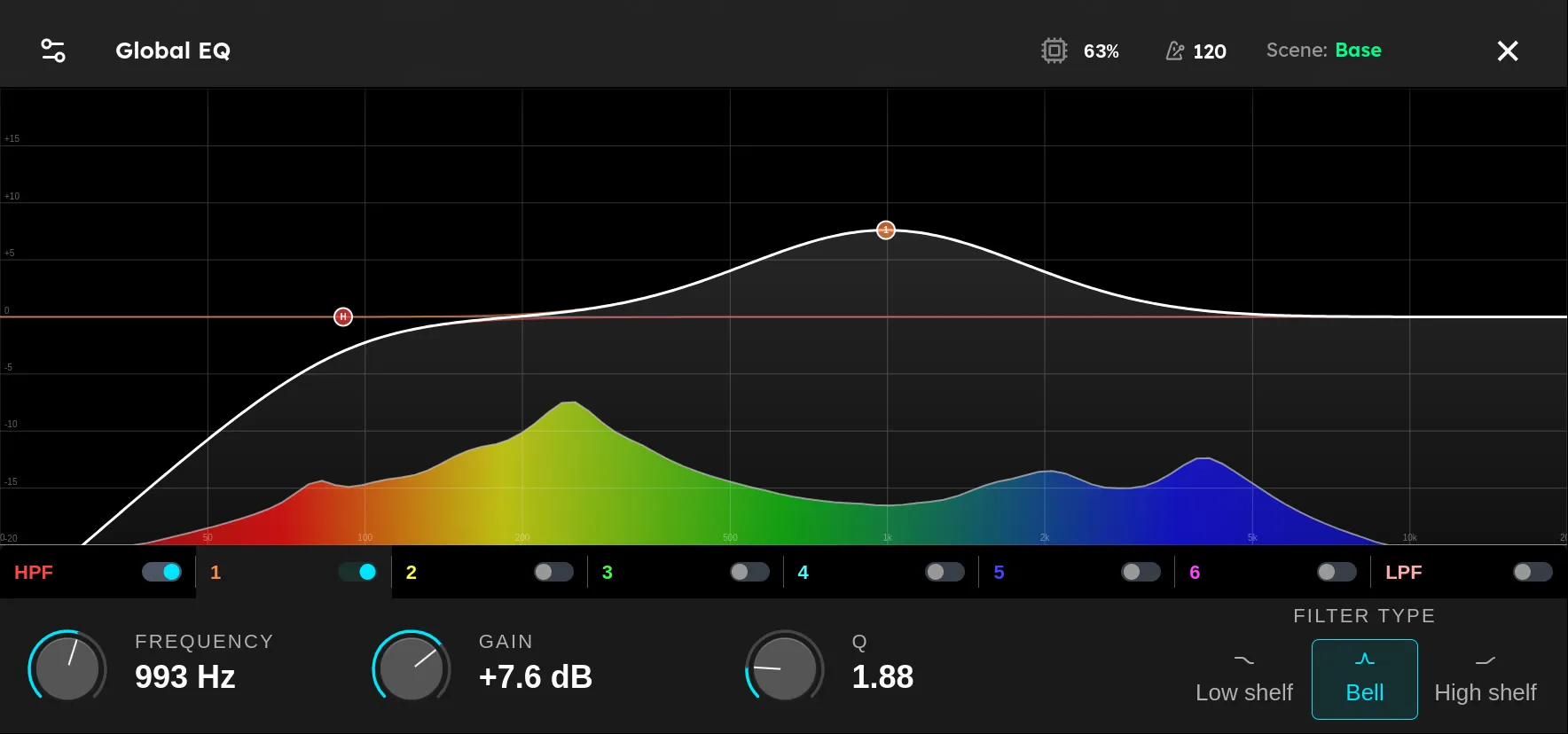
The Global EQ is an equalizer on the output of every rig. It sits after your rig and before the master volume, so whatever rig is loaded, its sound passes through the Global EQ on the way to your speakers.
Use it to fix the speaker, not the rig. Your rigs should sound right on their own. The Global EQ corrects what the playback system adds on top: a boomy room, a bright PA, a powered speaker with a bump in the low mids, or headphones that hide the bass. Set it once for where you are playing, and every rig benefits.
To open it, tap the menu button at the top left of the screen and choose Global EQ. You can also open it from Settings. Tap ✕ at the top right to go back to your rig.
Like the Mixer, the Global EQ belongs to the unit, not to a rig. It stays the same when you change rigs, scenes, or set lists, and Axion keeps it when you turn it off.
What it affects
- Main outputs (OUT L and OUT R): yes.
- Headphones: yes. The headphones play the same mix as the main outputs.
- FX sends (FX 1 and FX 2): no. An FX Loop sends the signal from its place in your rig, untouched by the Global EQ.
The graph
The graph shows frequency from 20 Hz on the left to 20 kHz on the right, and gain in dB up the side. The line marked 0 is flat: no boost and no cut.
- The white curve is the combined effect of every band that is on. Where it is above 0, those frequencies are boosted. Where it is below, they are cut.
- The colored spectrum behind it is a live analyzer of Axion’s output. Play and watch it to see where the energy in your sound is.
- Each band that is on has a node on the curve: H for the high-pass filter, 1 to 6 for the six main bands, and L for the low-pass filter.
Drag a node to move its band. Left and right changes the frequency. Up and down changes the gain. The H and L nodes only move left and right.
The bands
The row under the graph has one switch for each band. Tap a band’s name to select it, so the controls below show its settings. Tap its switch to turn it on or off. A band that is off does nothing, and its node disappears from the graph.
| Band | What it does |
|---|---|
| HPF | High-pass filter. Cuts everything below its frequency. Use it to remove rumble and boom. |
| 1 to 6 | Main bands. Each one boosts or cuts around its frequency. |
| LPF | Low-pass filter. Cuts everything above its frequency. Use it to remove fizz and hiss. |
To take the Global EQ out completely, turn every band off.
Controls
The bottom row shows the settings for the selected band. Knobs A, B, and C below the screen turn Frequency, Gain, and Q, in that order. You can also turn the controls on screen.
- Frequency: where the band works, from 20 Hz to 20 kHz.
- Gain: how much the band boosts or cuts, from −12 dB to +12 dB.
- Q: how wide the band is, from 0.1 to 10. A low Q affects a broad range of frequencies around the band’s frequency. A high Q affects a narrow range.
- Filter type: the shape of the band.
- Low shelf boosts or cuts everything below the frequency.
- Bell boosts or cuts a range centered on the frequency.
- High shelf boosts or cuts everything above the frequency.
HPF and LPF only use Frequency. When one of them is selected, Gain and Q are dimmed and the filter type choices are not shown.
Setting it up
- Load a rig you know well, one that sounds right on a system you trust.
- Play it through the speakers, room, or PA you want to correct, at the volume you will play at.
- Listen for what is wrong compared with how the rig should sound, and use the analyzer to find where it is.
- Fix it with the fewest bands and the smallest moves you can. Cut what is too loud before you boost what is missing.
- Switch to a few other rigs and check that they all sound better, not just the one you started with.
Some common fixes:
- Boomy room or stage: turn on HPF and raise it until the boom clears, often somewhere around 80 to 120 Hz.
- Harsh or fizzy through full range speakers: turn on LPF and bring it down until the fizz goes, or use a High shelf with a small cut.
- One note booms louder than the rest: use a Bell with a high Q and a cut, and move it until that note evens out.
- Muddy: try a broad Bell cut somewhere between 200 and 400 Hz.
Tips
- If you find yourself boosting a lot, turn down the boost and check the Mixer output levels and the master volume instead. Big boosts push the output toward its limit.
- If every rig needs the same change at stage volume, try ON STAGE in the Mixer first. It corrects for how your ears hear loud sound, and you may need less Global EQ with it on.
- If only one rig needs a change, put a Signal 8-Band EQ in that rig instead. The Global EQ is for problems every rig shares.
- When you move to a different room or playback system, revisit the Global EQ. A correction that helped one room can hurt in another.