The Signal Chain
How audio flows through Axion, from input through devices in series to outputs.
A signal chain is the ordered path your guitar’s audio takes through the unit. Audio enters at the instrument input, passes through each device in turn, and exits at the outputs.

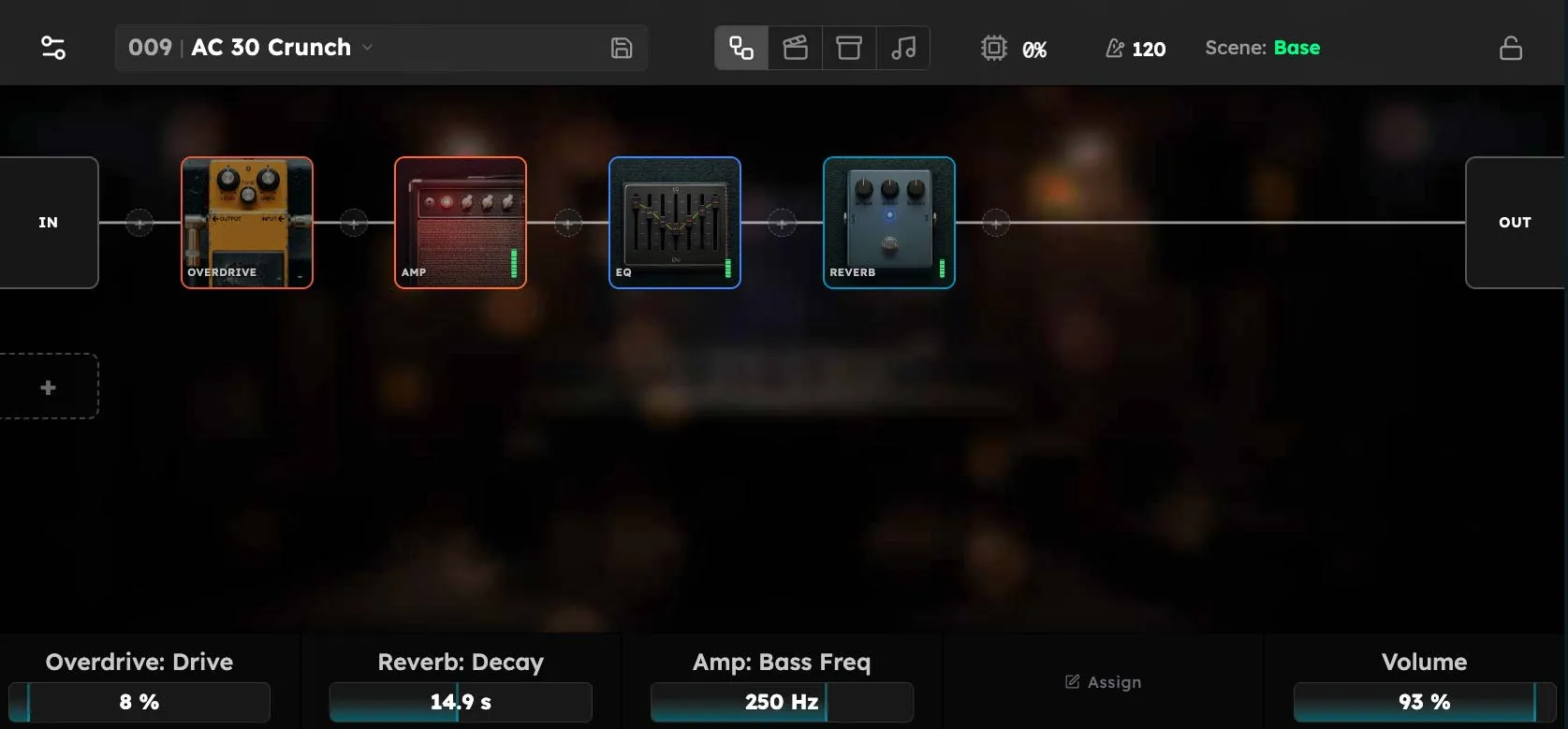
Order matters. Putting an overdrive before a delay is a different sound than putting a delay before an overdrive, exactly as it would be on a pedalboard. The Axion chain is a digital version of the same idea, with the same intuition.
What goes in the chain
Anything that processes audio: amp simulators, drives, cabinet simulators, EQs, compressors, modulation, delays, reverbs, and utility devices like boost or gain trim. A chain can be as short as a single device or as long as your CPU budget allows.
For the full list of what’s available, see the Device Reference.
If you set up parallel chains, Axion will automatically determine if those chains can be run on parallel processor cores to increase DSP capacity, and will assign the chains to cores accordingly.
How a chain is built
You add devices to the chain one at a time, then arrange and tune them. Each device exposes a small set of parameters (knobs) you adjust to dial in the sound. The chain plus all device parameters together make up a rig, which is what you save and recall.
Mono vs stereo
Most devices in the chain operate on stereo audio internally, even though your guitar input is mono. Modulation, delays, and reverbs are where stereo width typically appears. The output stage routes audio to whichever physical outputs you have connected.
To receive stereo audio, open the chain’s input node and turn Input Source to IN 1+2 (Stereo) or IN 3+4 (Stereo). The first input feeds the left channel and the second feeds the right. The IN 1–4 (Mono) choices each feed one input to both channels. Choose Custom to set Left In and Right In independently. Stereo input does not change how mono devices process audio.
On the output node, Output Destination offers OUT 1+2 (Stereo) and FX 1+2 (Stereo) (outputs 3+4). The first output receives the left channel and the second receives the right. Mono destinations sum both channels into the selected output using the existing routing, without reducing their levels. Choose Custom to set Left Out and Right Out independently. Double-tap the selector’s caption to restore the default stereo output on OUT 1+2.
CPU budget
The chain runs on a real-time audio thread with a fixed time budget per audio buffer. In practice this means there is a soft limit on how many heavy devices (amps, convolution cabs, lush reverbs) you can stack before you risk audio dropouts. Lightweight devices (boost, EQ, simple drives) cost very little. See Troubleshooting for help with audio dropouts.
Parallel chains use multiple cores
The budget above is per core, not per unit. When a rig has parallel chains, Axion analyzes the routing and automatically spreads independent chains across separate processor cores so they run at the same time rather than competing for one. Because each core carries its own share of the work, splitting a heavy rig into parallel chains can raise its total DSP capacity well beyond what a single serial chain could sustain. Chains that depend on each other’s output stay on the same core, since they cannot run simultaneously anyway; you do not assign cores by hand.
Buffer size trades latency for capacity
The size of the audio buffer sets how much time the chain has to finish each block: a larger buffer gives the audio thread proportionally more time per callback, so it raises the ceiling on how many heavy devices you can run before dropouts, at the cost of higher latency. A smaller buffer lowers latency but tightens the budget. The buffer size is configurable under Settings → Audio Engine; the new size takes effect after the next Axion startup. If a rig you rely on is close to the edge, a larger buffer is often the simplest way to buy back headroom.
Third-party plugins are a common reason to raise the buffer. Axion supports the LV2 and VST3 specifications, but not all plugins are written for hard real-time use: some allocate memory, take locks, or do uneven amounts of work from block to block, which can cause dropouts even when the plugin’s average CPU cost looks modest. A larger buffer can help alleviate this by giving these plugins more slack, though it will not always fix a plugin that is poorly behaved. If a rig only misbehaves after you add a particular plugin, test the rig without it, and try a larger buffer when you want to keep it in the chain.