Tuner
Tune silently or through, read pitch and cents, and set the reference frequency.

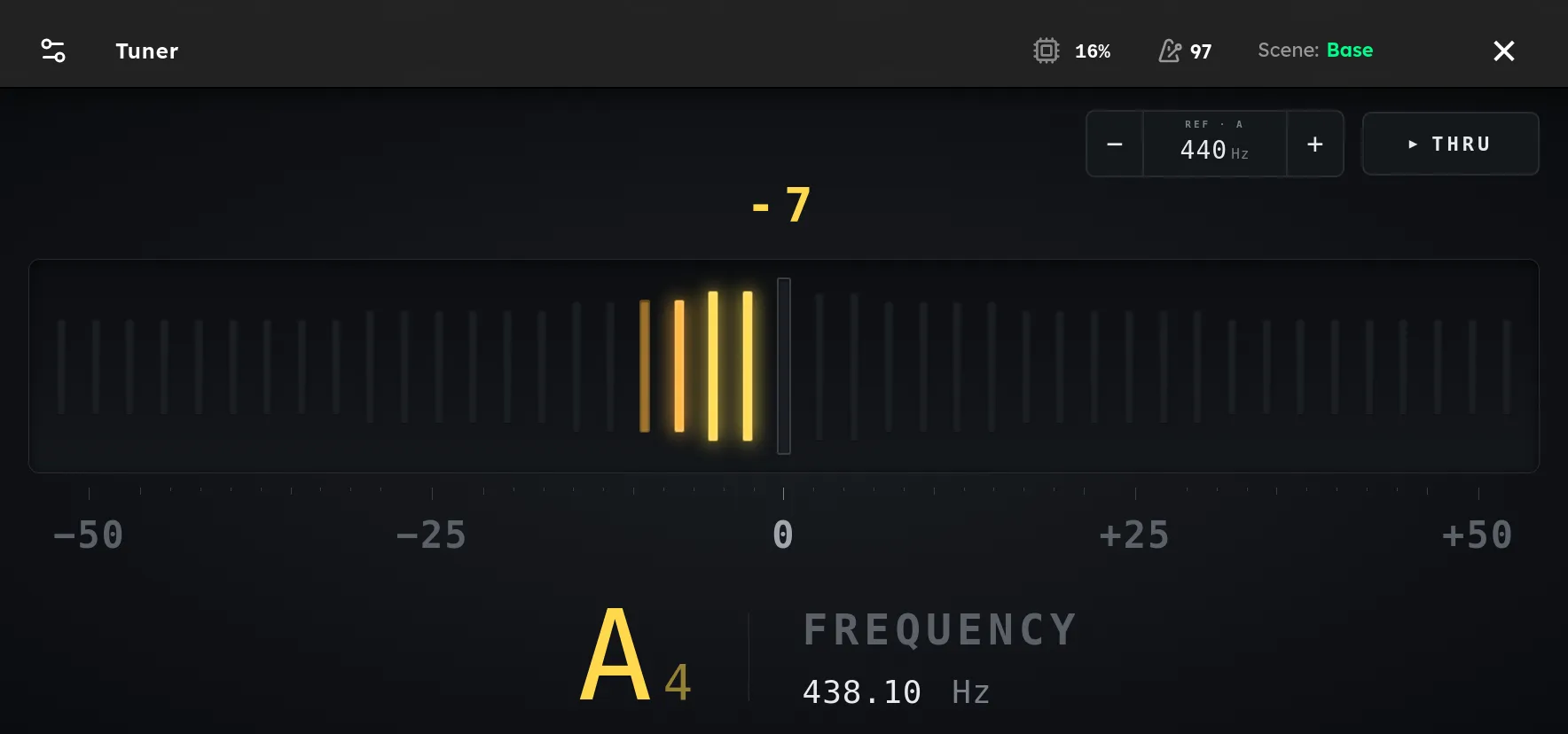
Axion’s tuner listens to the instrument input and shows the nearest note, its octave, the measured frequency, and the distance from the note in cents. Open it by holding knob E, whose Tuner label is printed on the panel. You can also open Tuner from the navigation menu or assign its Open or Toggle command to a footswitch or knob. Close the tuner by pressing the switch again.
The output is muted when the tuner opens, so you can tune silently. The pitch display continues to work while muted. Tap MUTED to change the button to THRU and hear the instrument while tuning. Tap it again to mute the output. Closing the tuner restores normal audio automatically.
Reading the display
Play one string and let the note settle. The detected note and octave appear at the bottom left, with the measured frequency beside them. The number above the meter shows the pitch error in cents.
- Lit bars to the left of center mean the note is flat. Raise its pitch.
- Lit bars to the right of center mean the note is sharp. Lower its pitch.
- At three cents or less from the target, the center bar turns green and the display reads IN TUNE.
The scale covers 50 cents on either side of the target. A cent is one hundredth of the distance between two neighboring semitones, so small values near zero represent small tuning adjustments.
Setting the reference pitch
The REF A control sets the frequency used for A4. It starts at the standard 440 Hz. Tap the minus or plus button to adjust it one hertz at a time from 430 Hz to 450 Hz. All detected notes are calculated from this reference, which lets you match instruments or recordings that use a pitch other than A440.
Closing the tuner
Tap the close button in the upper right, or press any footswitch. While the tuner is open, a footswitch press closes it without also triggering the switch’s normal rig, scene, or stomp assignment.
Tips
- Tune one string at a time and mute the other strings to reduce sympathetic vibration.
- Use a clear, steady note rather than a hard pick attack. The display waits briefly for the pitch to settle.
- Check tuning again after large adjustments because changing one string’s tension can slightly affect the others.
- Use THRU when you need to hear the instrument, and switch back to MUTED when silent tuning is more appropriate.