The Reverend
Tonewheel organ played by MIDI routed to it, such as Guitar MIDI earlier in the chain or a keyboard. Nine drawbars on each of two manuals and two for the pedals, percussion, scanner vibrato and chorus, key click, swell, overdrive and tone. Its sound replaces the chain signal; put a rotary speaker after it for the classic spinning sound.
Parameters
| Parameter | Range | Default |
|---|---|---|
| Upper 16’ | 0 – 8 | 8 |
| Upper 5 1/3’ | 0 – 8 | 8 |
| Upper 8’ | 0 – 8 | 8 |
| Upper 4’ | 0 – 8 | 0 |
| Upper 2 2/3’ | 0 – 8 | 0 |
| Upper 2’ | 0 – 8 | 0 |
| Upper 1 3/5’ | 0 – 8 | 0 |
| Upper 1 1/3’ | 0 – 8 | 0 |
| Upper 1’ | 0 – 8 | 0 |
| Percussion | Off, On | Off |
| Perc Harmonic | 2nd, 3rd | 3rd |
| Perc Decay | Fast, Slow | Fast |
| Perc Level | Soft, Normal | Normal |
| Vibrato | Off, V1, V2, V3, C1, C2, C3 | C3 |
| Vibrato Upper | Off, On | On |
| Vibrato Lower | Off, On | Off |
| Scanner Rate | 4 – 9 Hz | 6.9 Hz |
| Width | 0 – 100 % | 50 % |
| Key Click | 0 – 100 % | 30 % |
| Swell | 0 – 100 % | 100 % |
| Drive | 0 – 100 % | 15 % |
| Tone | 0 – 100 % | 100 % |
| Volume | 0 – 100 % | 70 % |
| Lower 16’ | 0 – 8 | 0 |
| Lower 5 1/3’ | 0 – 8 | 0 |
| Lower 8’ | 0 – 8 | 8 |
| Lower 4’ | 0 – 8 | 5 |
| Lower 2 2/3’ | 0 – 8 | 3 |
| Lower 2’ | 0 – 8 | 0 |
| Lower 1 3/5’ | 0 – 8 | 0 |
| Lower 1 1/3’ | 0 – 8 | 0 |
| Lower 1’ | 0 – 8 | 0 |
| Pedal 16’ | 0 – 8 | 8 |
| Pedal 8’ | 0 – 8 | 0 |
| Upper Channel | Any, 1, 2, 3, 4, 5, 6, 7, 8, 9, 10, 11, 12, 13, 14, 15, 16 | Any |
| Lower Channel | Off, 1, 2, 3, 4, 5, 6, 7, 8, 9, 10, 11, 12, 13, 14, 15, 16 | Off |
| Pedal Channel | Off, 1, 2, 3, 4, 5, 6, 7, 8, 9, 10, 11, 12, 13, 14, 15, 16 | Off |
| Sustain Pedal | Off, On | Off |
Overview
The Reverend is a tonewheel organ: two manuals (keyboards) with nine drawbars each, pedals with two, percussion, the scanner vibrato and chorus, key click and an overdriven preamp. It makes its own sound from the notes it receives, and that sound replaces the signal in its chain. You find it in the Synth category of the device browser.
It has no rotary speaker of its own. Put Rotarian after it in the chain for the spinning sound, and switch Slow and Fast there.
Playing it
The Reverend is an instrument, so it needs notes (see MIDI Instruments):
- From a keyboard: connect one to MIDI In and play. Out of the box every channel plays the upper manual.
- From your guitar: add Guitar MIDI to the rig and play. A chain of IN › Guitar MIDI › The Reverend › Rotarian › OUT is a whole organ rig.
Two things differ from a synth:
- How hard you play does not change the level. As on the real instrument, velocity only sharpens the key click and the percussion.
- It does not bend. An organ has fixed pitches, so The Reverend ignores pitch bend: a bent string keeps sounding the note you picked.
The console
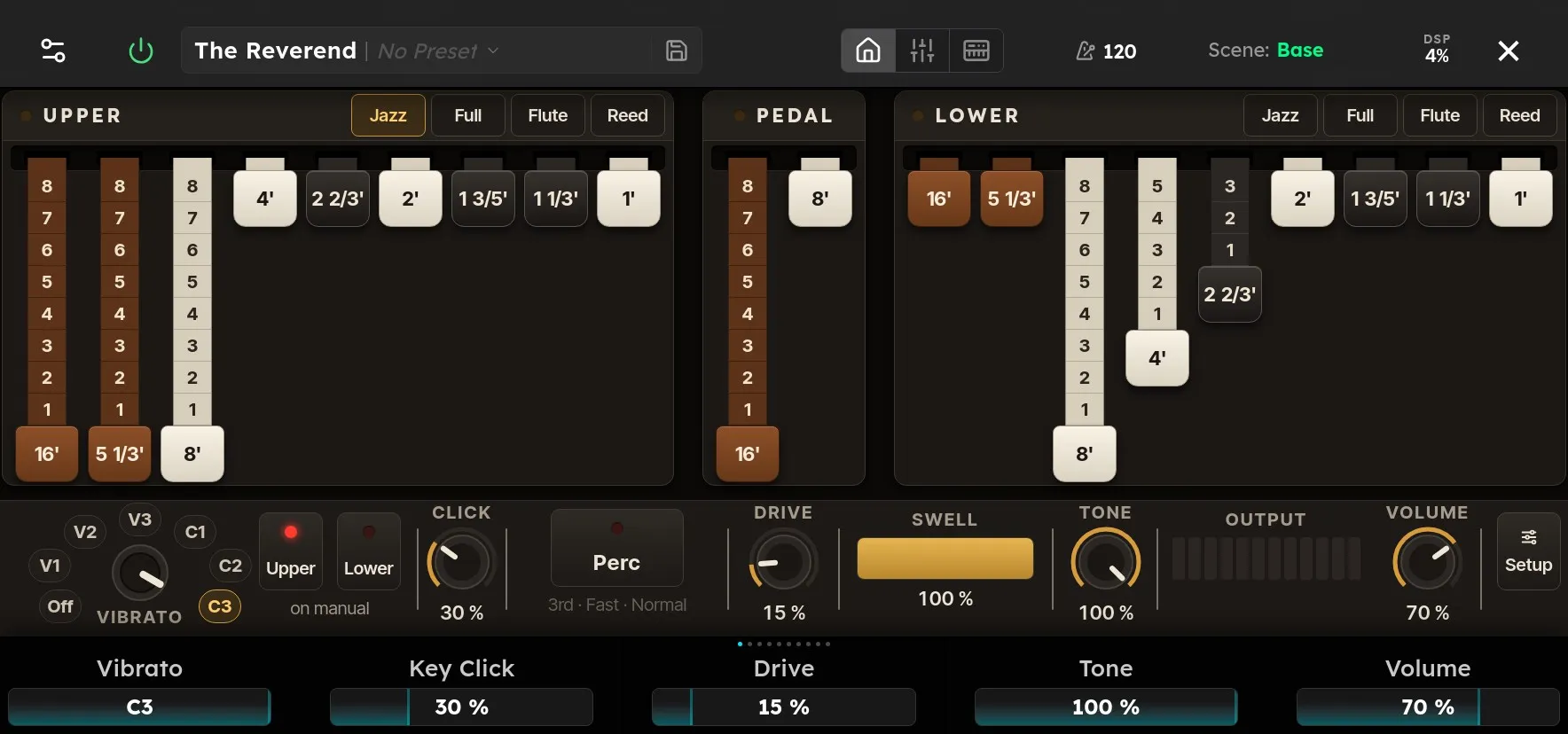
The screen is laid out like the top of an organ: the drawbars across the top, the switches and knobs in a row under them.
Drawbars
Each drawbar adds one pitch to every key you hold. Pull it down for more: 0 is off, 8 is full, and each step is 3 dB. Drag the cap, or tap anywhere in its column to jump there. The numbers on the rod show how far out it is.
| Drawbar | What it adds |
|---|---|
| 16’ | An octave below the note |
| 5 1/3’ | A fifth above the note |
| 8’ | The note itself |
| 4’ | An octave above |
| 2 2/3’ | An octave and a fifth above |
| 2’ | Two octaves above |
| 1 3/5’ | Two octaves and a third above |
| 1 1/3’ | Two octaves and a fifth above |
| 1’ | Three octaves above |
The colours are the traditional ones: brown for the two lowest, white for the octaves, black for the fifths and the third.
The three trays are the Upper manual, the Pedal board (16’ and 8’ only) and the Lower manual. The light by each name glows while keys are down on it.
Jazz, Full, Flute and Reed at the top of each manual set its nine drawbars in one tap. A button stays lit for as long as the drawbars match it, however they got there.
Lower and Pedal are greyed until you give them a MIDI channel on the Setup view; Lower shows Ch off until then. Their drawbars still move while greyed, so you can set them up first.
Vibrato and chorus
The selector on the left chooses the scanner’s setting: Off, V1 to V3 for vibrato, or C1 to C3 for chorus (the vibrato mixed with the straight sound), each from light to deep. Tap a position, or drag the knob up and down.
The Upper and Lower buttons beside it choose which manuals go through the scanner. The pedals never do.
Perc
Perc turns percussion on: a short, decaying ping on the first key of a phrase, on the upper manual only. Keys played legato do not fire it again; lift all the keys and the next one does. Its light flares on each ping.
While percussion is on, the Upper 1’ drawbar is silent, as on the real instrument, and is greyed.
The line under the button shows the percussion’s settings, which are on the Setup view.
Knobs, Swell and Output
- Click: the click of the key contacts on every press and release.
- Drive: the preamp’s overdrive, from warm to growling. 0 % is clean.
- Tone: darkens the organ as you turn it down.
- Volume: the organ’s level.
- Swell: the organ’s volume pedal. Drag along the bar to set it. Closing the swell also cleans up the drive, so it is the organ’s expression control and not just a volume.
- Output: the level the organ is sending out.
Drag a knob up and down to turn it. The Click, Drive, Tone and Volume knobs and the vibrato selector sit directly above the encoders that turn them.
The swell pedal
There are two ways to put Swell under your foot:
- Assign the EXP pedal to the Swell parameter (see Rig Controls). The bar follows the pedal.
- Use a keyboard’s expression pedal. The Reverend follows MIDI CC 11. The bar’s fill then shows the pedal, and a thin line marks where Swell itself is set. The pedal works within that setting.
The Setup view
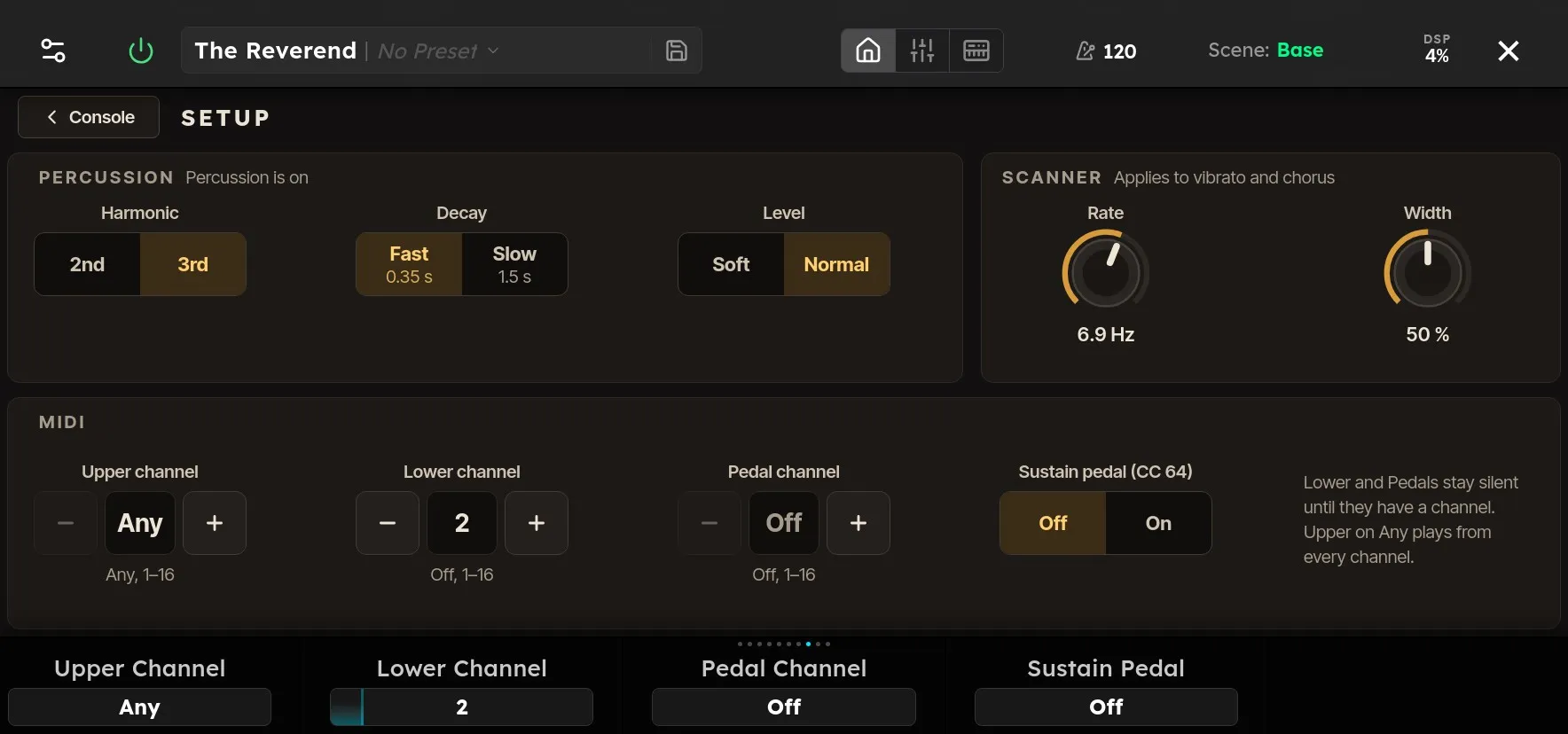
Tap Setup at the right of the console for the settings you make once and leave. Console takes you back.
Percussion
- Harmonic: the pitch of the ping. 2nd is an octave above the key, 3rd an octave and a fifth.
- Decay: Fast (about a third of a second) or Slow (a second and a half).
- Level: Normal, or Soft at half that.
These are greyed while Perc is off.
Scanner
- Rate (4 to 9 Hz, 6.9 by default): the speed of the vibrato and chorus.
- Width (0 to 100 %): how far the vibrato spreads between left and right. At 0 % both sides are the same.
These are greyed while the vibrato is Off.
MIDI
- Upper channel: Any by default, which takes every channel the Lower and the Pedals are not using. That is why one keyboard, or Guitar MIDI, plays the organ with no setup.
- Lower channel and Pedal channel: Off by default. Give one a channel and it plays from that channel; the Upper gives that channel up. The Lower plays keys from C2 to C7 and the Pedals from C2 to G4.
- Sustain pedal (CC 64): Off by default, because an organ has none. Turn it on and a sustain pedal holds the keys you release while it is down, on the manuals that share its channel. Held keys count as still down, so percussion does not fire again until you let everything go.
For example, to play the Upper from a keyboard and the Lower from your guitar, set the keyboard to channel 1 and Guitar MIDI to channel 2, then set Lower channel to 2.
Which inputs reach The Reverend at all is set in the device’s MIDI view (see MIDI Instruments). If a swell or sustain pedal on a keyboard does nothing, check that Receive CCs is on for that input there.
The encoders
Touching a control turns the encoder dock to the page that holds it. The dock has these pages:
- Vibrato, Key Click, Drive, Tone, Volume
- Upper 16’, 5 1/3’, 8’, 4’, 2 2/3’
- Upper 2’, 1 3/5’, 1 1/3’, 1’
- Pedal 16’, Pedal 8’, Swell
- Lower 16’, 5 1/3’, 8’, 4’, 2 2/3’
- Lower 2’, 1 3/5’, 1 1/3’, 1’
- Perc Harmonic, Perc Decay, Perc Level, Scanner Rate, Width
- Upper Channel, Lower Channel, Pedal Channel, Sustain Pedal
Two more pages follow with Percussion, Vibrato Upper, Vibrato Lower and the trims every device has. Swiping the dock never changes the view, so you can turn Scanner Rate from the console.
Presets
The presets are starting points: try them, then move the drawbars.
- Default: the first three upper drawbars full, chorus C3, a little drive.
- Sunday Service: the same with the upper 1’ added on top, and more drive.
- Testify: the first three drawbars with percussion on.
- Choir Loft: a soft flute, 8’ and 4’, with light vibrato, no drive and a darker tone.
- Vespers: a mellow 8’, 4’ and 2 2/3’ with light chorus and the tone turned well down.
- Full Revival: every upper drawbar out.
- Brimstone: the first four drawbars, heavy drive and more key click.
Tips
- Start with the first three upper drawbars (the Jazz button) and pull the higher ones out a little at a time to brighten the sound.
- For the classic jazz sound, use the first three drawbars with Perc on and the chorus on C3.
- Ride the Swell while you play: with Drive up, opening the swell adds growl as well as level.
- Put Rotarian after The Reverend and put its Speed on a footswitch.